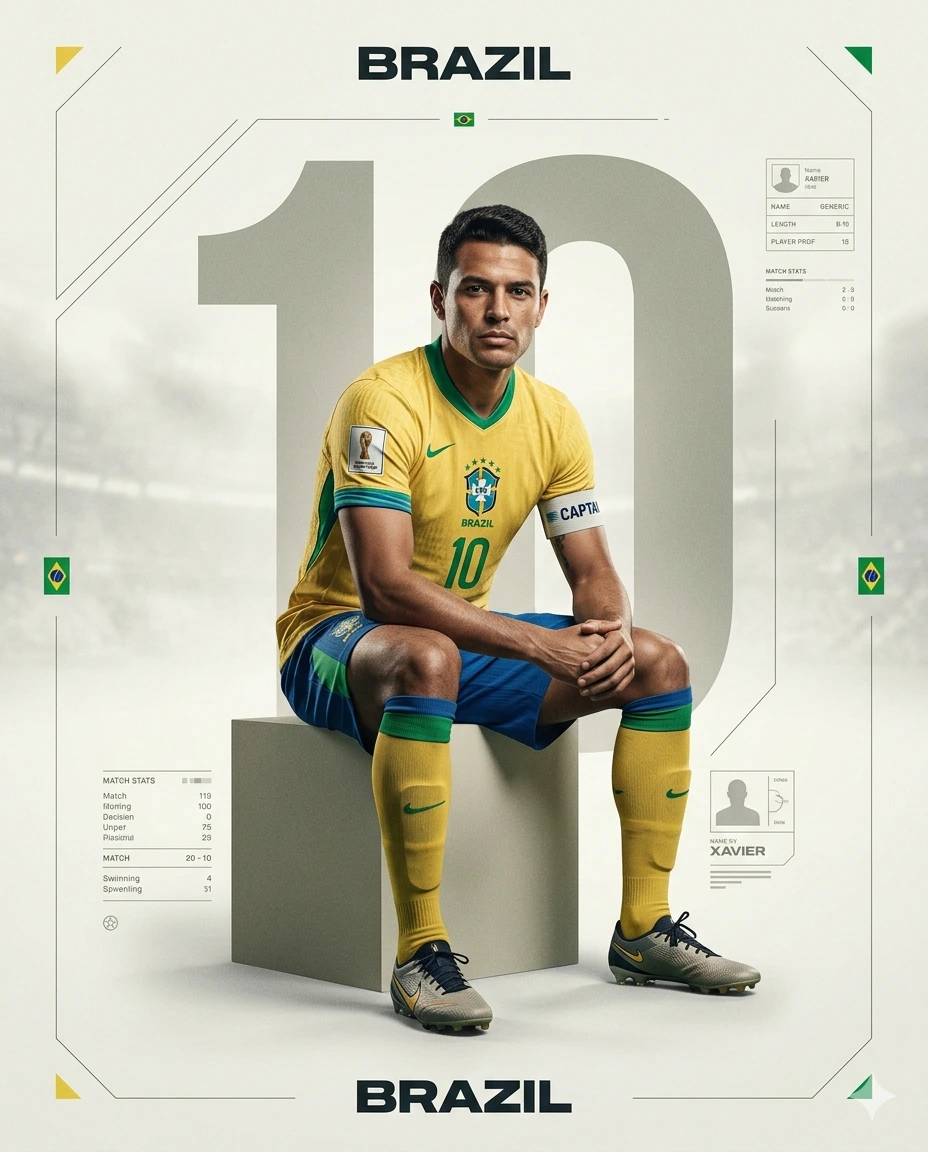
BRAZIL 10: Ultra-Realistic FIFA World Cup 2026 Editorial Football Poster – “Xavier” Campaign Portrait
A detailed sport image titled "BRAZIL 10: Ultra-Realistic FIFA World Cup 2026 Editorial Football Poster – “Xavier” Campaign Portrait", crafted with approximately 386 words of visual direction for Gemini AI. It produces a finished visual showcasing clear subject focus, harmonious color treatment, and refined environmental context suitable for portfolio, editorial, or commercial concept projects. Controlled studio-style lighting balances highlights and preserves micro-textures across surfaces without harsh blowout. Specific tactile material descriptors prevent flat procedural rendering, prompting the AI to render realistic tactile surface qualities. Industry-standard editorial and compositional cues guide the generative model toward balanced framing and restrained color harmony.
Prompt Content
Use this prompt in your favorite AI image generator.
Create a high-end, ultra-realistic football campaign poster using the uploaded photo as the primary reference. The final image must strictly preserve the identity, facial structure, skin tone, hairstyle, and expression from the uploaded photo, ensuring the face remains highly accurate and recognizable with no alteration, distortion, or beautification. Maintain natural skin texture and realistic imperfections. The subject is a professional football player sitting confidently on a geometric block in a clean studio-style environment. Match the pose from the uploaded photo as closely as possible, or adapt naturally while maintaining realistic anatomy. The player sits slightly leaning forward with elbows resting on knees and hands relaxed or loosely clasped, looking directly at the camera with a calm, focused, and determined expression.Adapt the entire design to Brazil’s national football identity, featuring a modern official-inspired kit with a yellow jersey, green accents, and subtle blue detailing. Include realistic fabric texture, stitching, matching socks, and professional football boots, with an optional captain armband. The player has natural athletic body proportions. Display Player Name “Xavier”, Team Name “BRAZIL”, and Jersey Number “10”. Use a centered composition with the player seated on a minimal geometric block. Place a large oversized semi-transparent number “10” vertically behind the player, and integrate a secondary number subtly beneath the platform. Add minimal geometric lines and thin UI-inspired football graphics, small Brazil flag accents on the sides, and a generic World Cup 2026–style badge in the upper corner (non-branded). Maintain clean negative space and a premium editorial poster layout.Apply Brazil’s national color palette: yellow (#FFDF00), green (#009C3B), and blue (#002776), with a soft beige or off-white neutral background for contrast. Use soft cinematic studio lighting with subtle rim light, realistic shadows, premium sports editorial contrast, and slightly desaturated tones for a high-end look. Include realistic jersey fabric texture, visible stitching, soft paper grain, subtle stadium haze, glossy highlight reflections, and a light vintage print texture.Style: modern FIFA World Cup campaign aesthetic, Nike/Adidas-level football editorial, cinematic athlete portrait, ultra-clean sports branding, realistic football photography. Output as a 4:5 vertical composition, ultra-realistic, sharp focus, minimalist luxury sports poster, clean and uncluttered.Negative prompt: distorted face, different identity, altered facial features, unrealistic skin, over-smooth skin, cartoon, CGI look, low detail, blurry, noise, extra limbs, bad anatomy, incorrect pose, wrong jersey colors, incorrect team identity, watermark, text errors, logo distortion, oversaturated colors.
How To Use
Reusable Guide- 1Copy the complete prompt text into your preferred AI image generator (e.g., Gemini AI).
- 2Review the initial output against the recommended aspect ratio (1:1) to verify composition.
- 3Customize the key variables above (such as subject & focal point or lighting & atmosphere) to suit your creative vision.
- 4Refine the guidance scale or apply negative prompt exclusions to eliminate any artifacts without compromising image fidelity.
For best results, use this prompt as-is before making edits — the defaults are already optimised.