CEO Magazine: The Future Is Mine
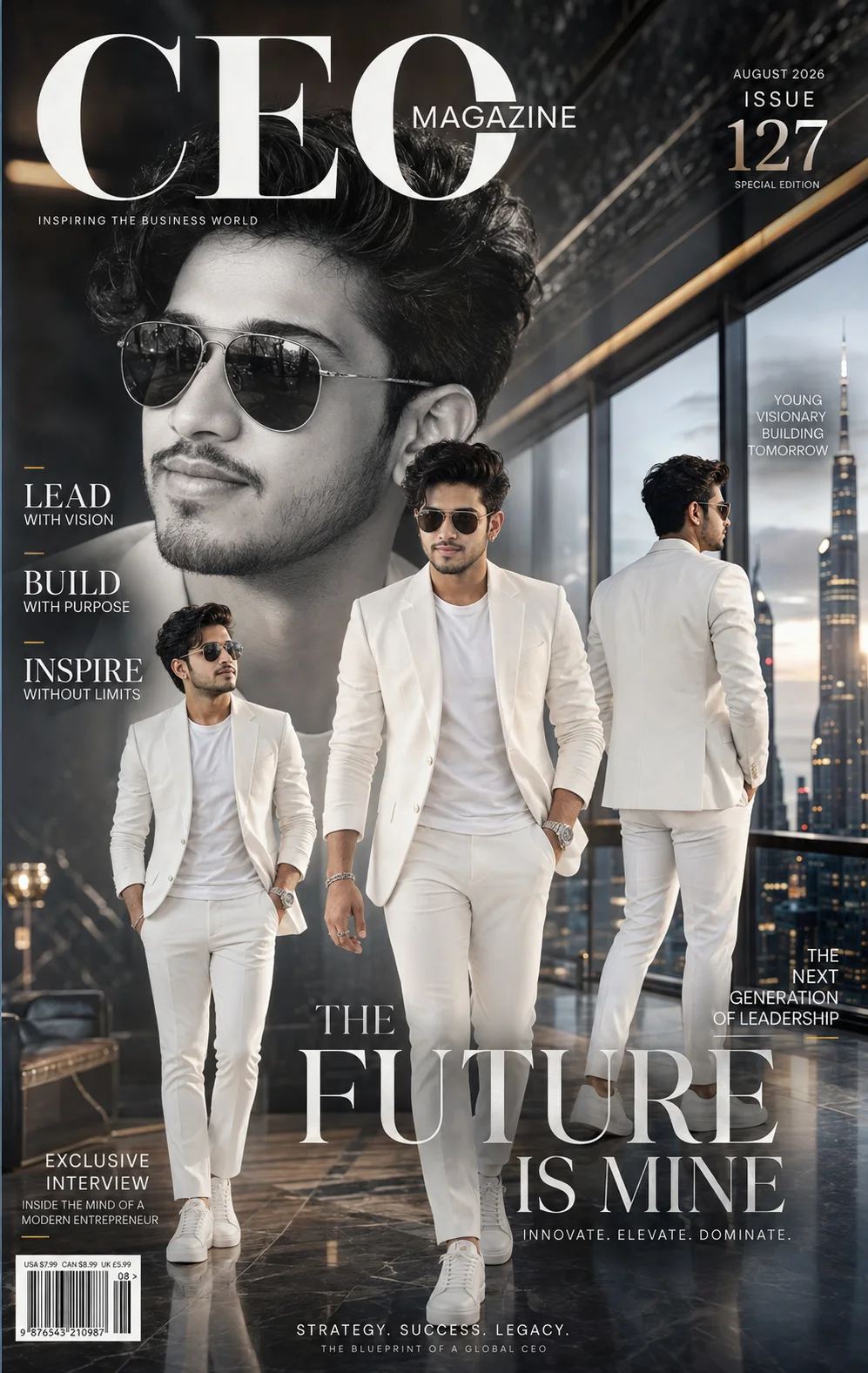
A detailed poster design image titled "CEO Magazine: The Future Is Mine", crafted with approximately 388 words of visual direction for Chat GPT. It produces a finished visual showcasing clear subject focus, harmonious color treatment, and refined environmental context suitable for portfolio, editorial, or commercial concept projects. Precise rim lighting outlines the subject's silhouette, cleanly separating foreground elements from the environment. Shallow depth of field with creamy optical bokeh draws immediate visual attention to fine subject details. Specific tactile material descriptors prevent flat procedural rendering, prompting the AI to render realistic tactile surface qualities.
Prompt Content
Use this prompt in your favorite AI image generator.
Create an ultra-realistic luxury CEO magazine cover featuring the same attractive young man with 100% identical facial features, natural skin texture, expressive eyes, and perfectly preserved hairstyle. Absolutely no facial modifications, AI alterations, or identity changes. Maintain exact facial proportions and realism from the reference image. The composition is designed as a world-class Forbes, GQ, Esquire, and Entrepreneur-style magazine cover. A massive monochrome close-up portrait dominates the background, seamlessly blended with three cinematic full-body poses: one walking confidently toward the camera, one standing with hands in pockets, and one overlooking the skyline from a floor-to-ceiling glass executive office. The setting is an ultra-luxury CEO penthouse on the top floor of a futuristic skyscraper. Behind him are breathtaking panoramic city lights, modern glass architecture, black marble walls, polished Italian stone floors, warm ambient lighting, and premium interior design with subtle reflections. The atmosphere radiates wealth, innovation, leadership, and global success. He wears a perfectly tailored all-white luxury suit with a fitted premium white crew-neck t-shirt, crisp white trousers, white designer sneakers, platinum luxury watch, silver bracelet, elegant rings, and premium aviator sunglasses. Every fabric fold is ultra-realistic with natural movement and luxury textile detail. The layout includes sophisticated magazine typography placeholders, elegant headlines, premium issue number, barcode placeholder, minimalist cover lines, and balanced negative space, creating the appearance of an authentic international business magazine. Add floating dust particles, soft white smoke, silver metallic paint strokes, geometric abstract elements, premium glass reflections, volumetric sunlight through the windows, cinematic rim lighting, creamy background bokeh, subtle lens flare, HDR highlights, and realistic environmental shadows. Luxury editorial photography, medium-format DSLR camera, Hasselblad X2D, 85mm portrait lens, f/1.4 aperture, ultra-sharp eyes, photorealistic skin pores, ultra-detailed hair strands, physically accurate lighting, ray tracing, global illumination, Octane Render, Unreal Engine 5 realism, cinematic color grading, award-winning magazine composition, masterpiece, best quality, luxury branding aesthetic, billionaire lifestyle, hyper realistic, ultra detailed, 8K, 10K, 16K. Color Palette: Pearl White, Platinum Silver, Matte Black, Deep Charcoal, Soft Gold Highlights, Executive Blue. Mood: Power, leadership, innovation, confidence, billionaire entrepreneur, global CEO, luxury lifestyle, modern success, timeless elegance. Negative Prompt: low quality, blurry, bad anatomy, deformed face, different face, duplicate person, extra limbs, extra fingers, cropped body, watermark, logo, text artifacts, distorted eyes, unrealistic skin, cartoon, anime, CGI appearance, oversaturated colors, noisy image, compression artifacts, motion blur, poor lighting, plastic skin.
How To Use
Reusable Guide- 1Copy the complete prompt text into your preferred AI image generator (e.g., Chat GPT).
- 2Review the initial output against the recommended aspect ratio (1:1) to verify composition.
- 3Customize the key variables above (such as subject & focal point or lighting & atmosphere) to suit your creative vision.
- 4Refine the guidance scale or apply negative prompt exclusions to eliminate any artifacts without compromising image fidelity.
For best results, use this prompt as-is before making edits — the defaults are already optimised.