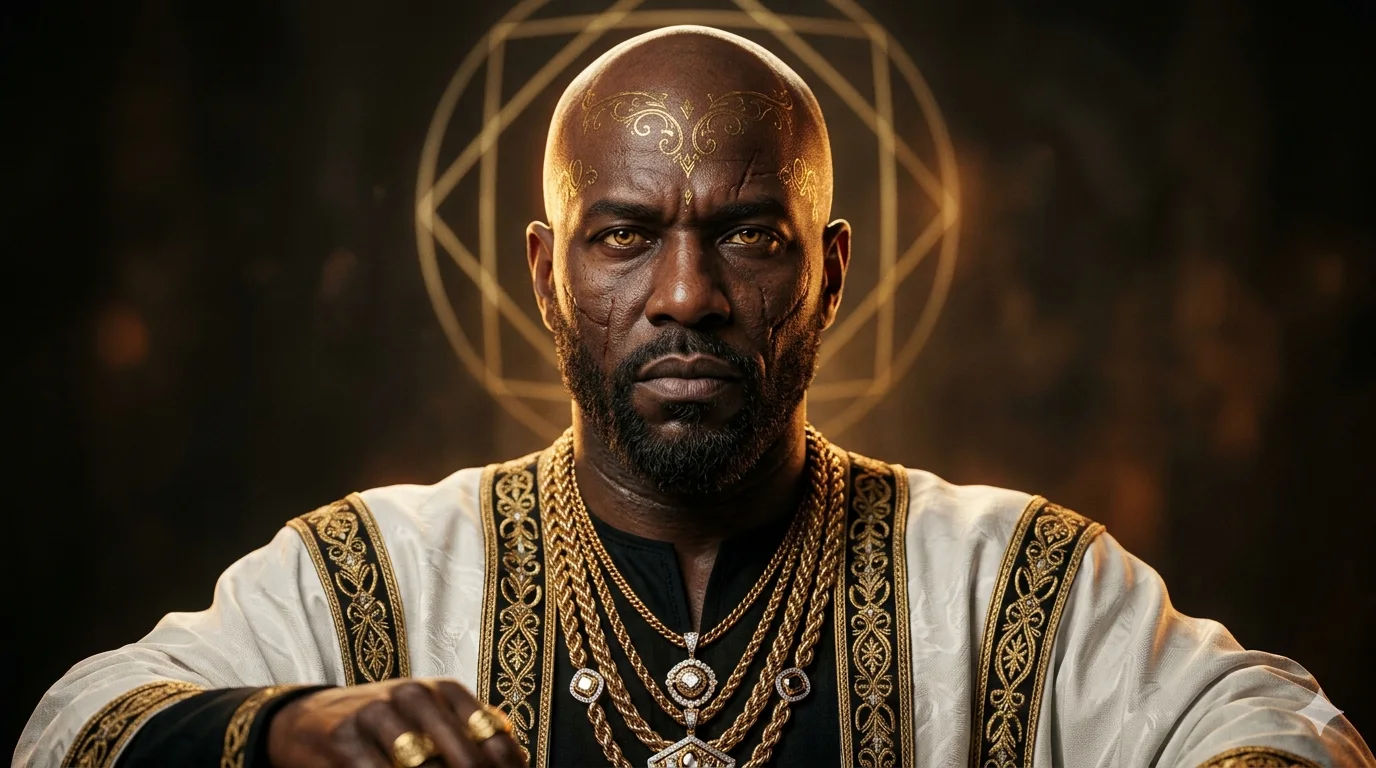
The Golden Sovereign: Regal Halo of Power
Create an epic men AI image using this high-quality prompt optimized for Gemini AI image generation.
Prompt Content
Use this prompt in your favorite AI image generator.
Hyper-realistic, cinematic head-and-shoulders portrait of a regal dark-skinned bald man with a short beard, centered composition, intense stoic expression and piercing amber-golden eyes; ornate gold filigree tattoo/markings across the forehead, deep healed scars along the cheeks, textured skin pores and subtle sweat, dramatic warm rim and key lighting creating rich chiaroscuro. He wears a white ceremonial robe with gold trim over a black inner garment, layered thick braided gold chains and diamond pendants. Glowing geometric golden halo behind his head, shallow depth of field, flawless skin detail, ultra high resolution, 85mm portrait lens look, studio lighting, moody warm color palette, photoreal, cinematic, editorial-quality, intricate jewelry reflections, volumetric light, award-winning portrait aesthetic.
How To Use
Reusable Guide- 1Copy the prompt using the "Copy Prompt" button above.
- 2Open your preferred AI model (Gemini AI) and paste the prompt into the input field.
- 3Optionally, replace bracketed placeholders (e.g. [subject], [style]) with your own values to personalise the output.
- 4Run the prompt and review the result — iterate by tweaking descriptors for different moods or compositions.
- 5Save or export your favourite generations directly from the AI tool's interface.
For best results, use this prompt as-is before making edits — the defaults are already optimised.