Urban Pulse — The Cyan & Gold Walk
Create an epic cinematic AI image using this high-quality prompt optimized for Gemini AI image generation.
Prompt Content
Use this prompt in your favorite AI image generator.
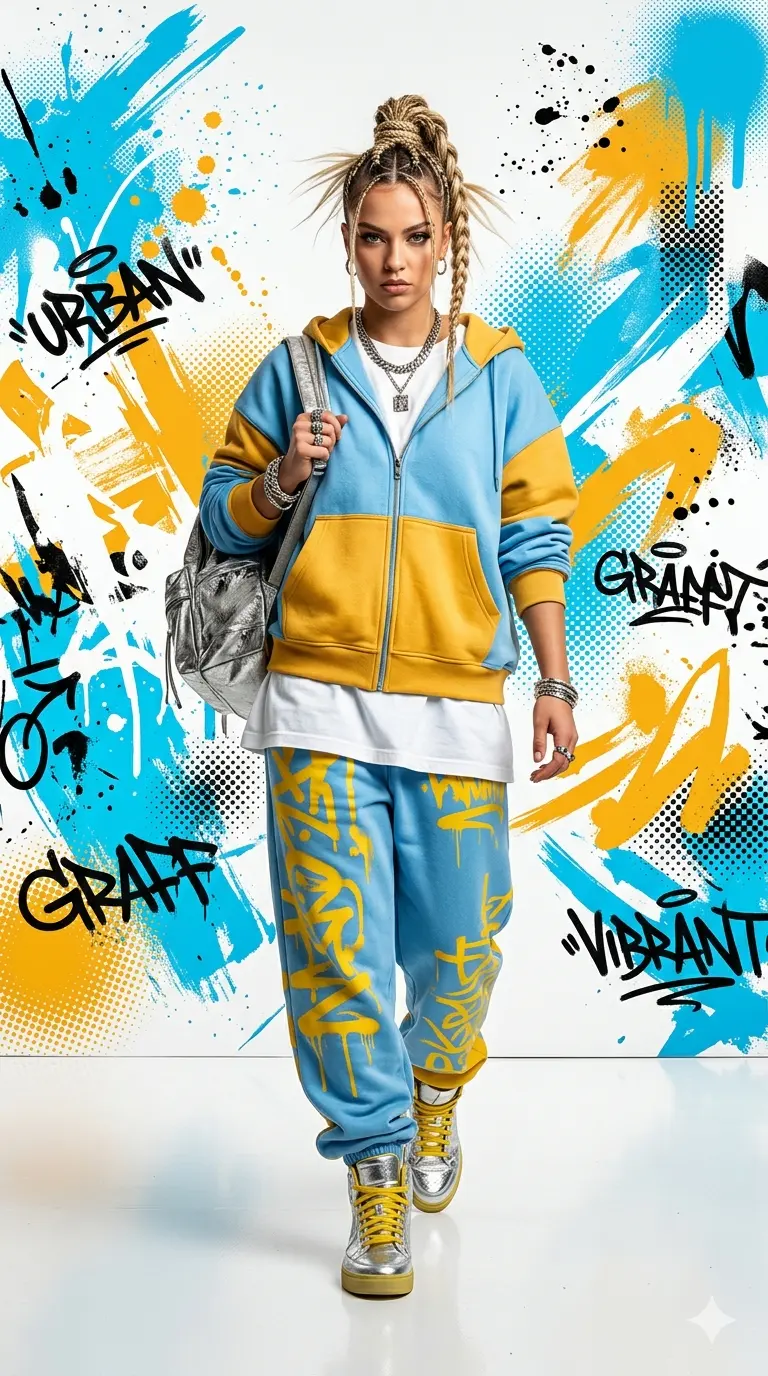
A full-body fashion editorial portrait of a young woman walking confidently toward the camera, set against a vibrant graphic art background. She is wearing oversized, layered urban streetwear consisting of a baggy sky-blue and golden-yellow color-blocked zip-up hoodie, matching loose sweatpants featuring abstract graffiti-style yellow patterns, a plain oversized white t-shirt, and metallic silver high-top sneakers with yellow laces.She carries a metallic silver backpack over one shoulder, wears a thick silver chain necklace and stacked bracelets, and has her blonde-streaked hair styled in a high, intricate braided ponytail. The background is a stark white canvas covered with energetic, textured splatters, brushstrokes, and abstract digital halftime screen patterns in bright cyan blue and marigold yellow. Studio lighting, sharp focus on the subject, high-contrast streetwear aesthetic, 8k resolution, clean catalog photography style. Aspect ratio is 9:16
How To Use
Reusable Guide- 1Copy the prompt using the "Copy Prompt" button above.
- 2Open your preferred AI model (Gemini AI) and paste the prompt into the input field.
- 3Optionally, replace bracketed placeholders (e.g. [subject], [style]) with your own values to personalise the output.
- 4Run the prompt and review the result — iterate by tweaking descriptors for different moods or compositions.
- 5Save or export your favourite generations directly from the AI tool's interface.
For best results, use this prompt as-is before making edits — the defaults are already optimised.