Back to Browse
Product

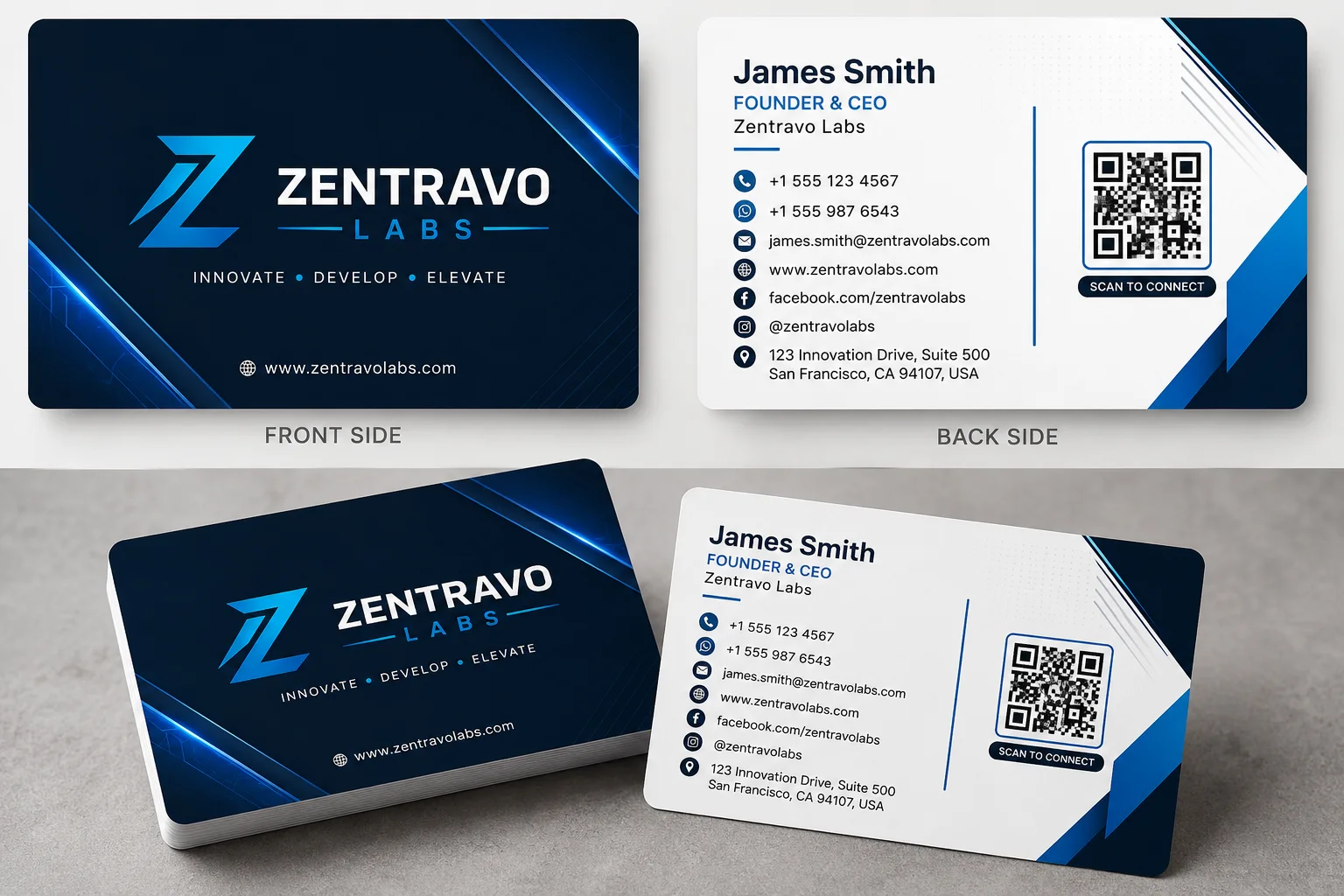
Modern business card mockup with blue accents

Create an epic product AI image using this high-quality prompt optimized for Chat GPT image generation.

0Views
0Likes
Modern business card mockup with blue accents

Prompt Content

Use this prompt in your favorite AI image generator.

Create a modern, premium, professional, and print-ready double-sided visiting card using the information provided below. ## CARD SIZE AND PRINT FORMAT Card Size: 3.5 × 2 inches Orientation: [Landscape / Portrait] Resolution: 300 DPI Color Mode: CMYK print-ready appearance Include 3 mm bleed area and safe margins. Use sharp, high-resolution text, icons, logos, and graphics. ## DESIGN STYLE Design Theme: [Modern / Corporate / Luxury / Minimal / Creative / Technology] Main Colors: [Color 01] + [Color 02] + [Color 03] Create a clean, elegant, premium, and professional layout with: * Clear visual hierarchy * Balanced spacing * Modern professional typography * Subtle gradients or abstract shapes * Thin decorative lines * Soft shadows where appropriate * Sufficient white space * High readability * Proper alignment * Premium business branding Do not make the design overcrowded. Do not use unnecessary graphics, excessive colors, heavy backgrounds, or difficult-to-read fonts. ## FRONT SIDE Place the following information professionally: Logo: [Upload or describe the logo] Business or Brand Name: [BRAND NAME] Tagline: [TAGLINE] Use the logo and brand name as the main visual focus. Add a premium abstract background, geometric pattern, gradient, or subtle brand-related graphic. ## BACK SIDE Add the following personal and contact information: Full Name: [YOUR FULL NAME] Job Title / Profession: [JOB TITLE] Company / Institution: [COMPANY NAME] Mobile Number: [PHONE NUMBER] WhatsApp Number: [WHATSAPP NUMBER] Email Address: [EMAIL ADDRESS] Website: [WEBSITE ADDRESS] Facebook Page: [FACEBOOK PAGE] Instagram / TikTok / YouTube: [SOCIAL MEDIA NAME] Office Address: [BUSINESS ADDRESS] QR Code: [WEBSITE / WHATSAPP / FACEBOOK / DIGITAL PROFILE LINK] Use suitable minimal icons beside the phone number, WhatsApp, email, website, social media, and address. ## QR CODE INSTRUCTIONS Place the QR code inside a clean white box. Maintain enough white space around the QR code. Do not crop, distort, decorate, blur, or cover the QR code. The QR code must remain clearly visible and scannable. ## TYPOGRAPHY Use a professional and modern font. Make the person’s name bold and prominent. Display the job title slightly smaller below the name. Keep all contact information clearly readable. Use correct spelling, punctuation, capitalization, and spacing. Do not add or invent any information. Use only the information provided. ## FINAL OUTPUT Generate separate high-resolution images for: 1. Front Side 2. Back Side 3. Realistic Visiting Card Mockup The final design must look professional, premium, balanced, elegant, and suitable for printing and business use. Present the card on a clean background without changing the original card design. Ensure all text is accurate, sharp, correctly aligned, and clearly readable.

Prompt Details

  • Category
    Product
  • Model
    Chat GPT
  • Aspect Ratio
    16:9
  • Prompt Length
    Long
  • Style
    Product
  • Difficulty
    Advanced
  • Published
    July 2026

Share this prompt

About This Prompt

Auto Generated

This is a high-quality Product AI prompt crafted by Admin. It is designed to produce stunning visuals with minimal iteration. The prompt uses carefully selected descriptors and stylistic cues optimised for Chat GPT, making it ideal for creators who want consistent, professional results.

Production ReadyBeginner FriendlyCreative Freedom

How To Use

Reusable Guide
  1. 1Copy the prompt using the "Copy Prompt" button above.
  2. 2Open your preferred AI model (Chat GPT) and paste the prompt into the input field.
  3. 3Optionally, replace bracketed placeholders (e.g. [subject], [style]) with your own values to personalise the output.
  4. 4Run the prompt and review the result — iterate by tweaking descriptors for different moods or compositions.
  5. 5Save or export your favourite generations directly from the AI tool's interface.

For best results, use this prompt as-is before making edits — the defaults are already optimised.