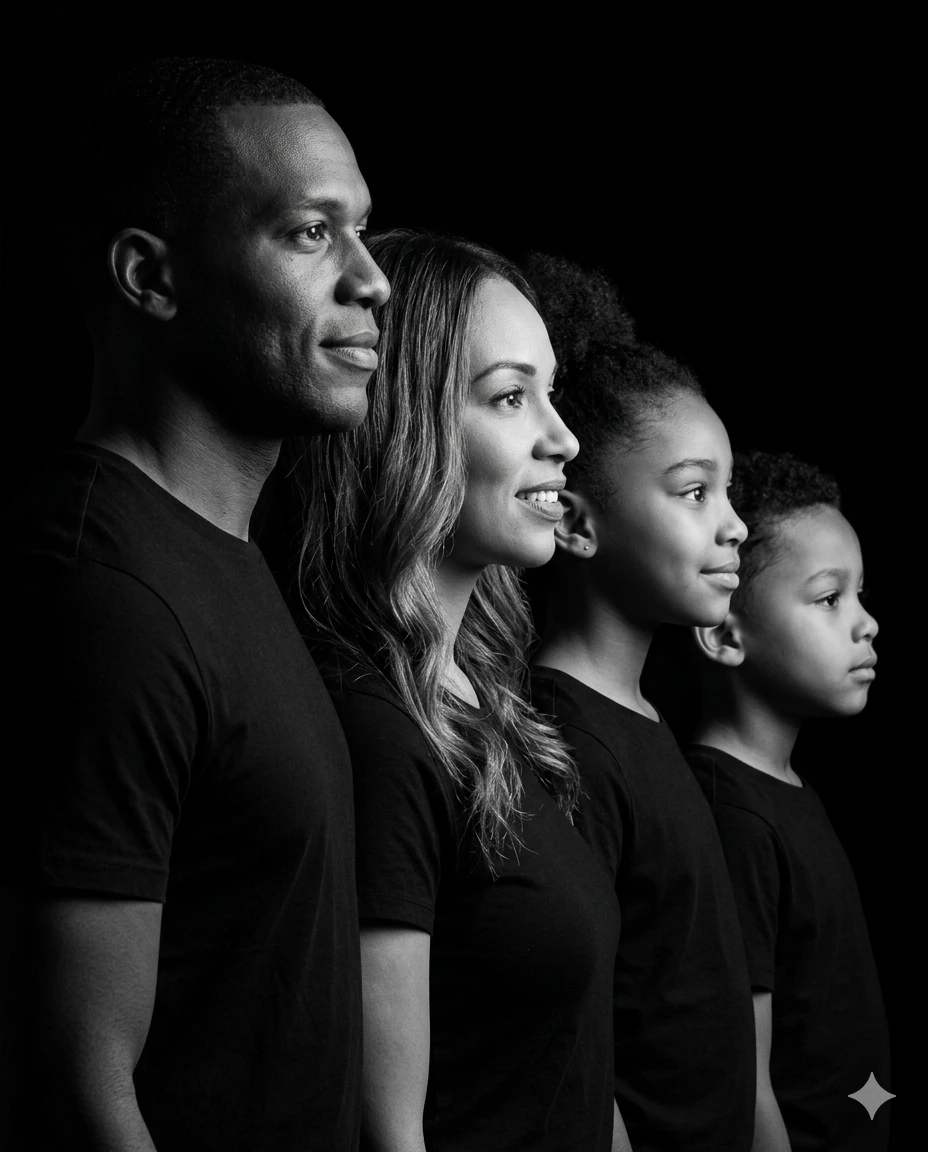
Timeless Legacy – Low-Key Black & White Family Side-Profile Portrait
A detailed family image titled "Timeless Legacy – Low-Key Black & White Family Side-Profile Portrait", crafted with approximately 443 words of visual direction for Gemini AI. It produces a finished visual showcasing clear subject focus, harmonious color treatment, and refined environmental context suitable for portfolio, editorial, or commercial concept projects. Controlled studio-style lighting balances highlights and preserves micro-textures across surfaces without harsh blowout. Shallow depth of field with creamy optical bokeh draws immediate visual attention to fine subject details. Specific tactile material descriptors prevent flat procedural rendering, prompting the AI to render realistic tactile surface qualities.
Prompt Content
Use this prompt in your favorite AI image generator.
Create a classic low-key black-and-white studio portrait of a family of four arranged in a staggered side-profile composition, all facing right. Maintain accurate identity and face matching to the provided reference image for all four subjects — preserve exact facial structure, proportions, skin texture, hairlines.Mid-chest shot (cropped from mid chest upward), tight vertical composition. All four subjects are wearing solid matte black t-shirts with no logos, no reflective elements — blending subtly into shadow while maintaining garment structure. Diagonal alignment from front-left (father closest to camera) to back-right (youngest child farthest). Overlapping layered composition. CRITICAL — Natural Height-Based Staggered Arrangement: Subjects must be arranged in realistic descending height order consistent with a natural family hierarchy. The father (foreground) is the tallest, followed slightly behind by the mother, who is slightly shorter. Behind her stands the first child, clearly shorter than the mother, and, in the far background, the second child, the shortest of all. The top of each subject’s head forms a gradual downward diagonal slope from left (tallest father) to right (shortest child). Eye levels must also progressively lower in the same sequence. This height progression must appear anatomically natural and realistic, not artificially aligned or equalized. Maintain accurate proportional scaling and perspective depth consistent with real-world height differences. True monochrome (black and white), high contrast, deep blacks, smooth midtone transitions. Dramatic chiaroscuro lighting with a single directional key light from camera-right, slightly above eye level, no equipment/object visible in frame. Strong shadow falloff into pure black background. Deep negative space on the left.Sharp catchlights in all eyes from a small gridded softbox. Crisp highlight definition on nose bridges, cheekbones, lips, and jawlines. Father (foreground, sharpest focus): His expression appears steady and confident with a subtle smile. His gaze is fixed forward, conveying strength and leadership. Visible individual hairs, strong skin micro-contrast, wear a black t-shirt fading into shadow.Mother (second): She has a soft, graceful smile (upper teeth visible). Long voluminous wavy hair, subtle earrings, smooth skin, and wear a black outfit. Child (third): Her expression shows youthful curiosity and positivity, with a subtle smile (upper teeth visible), slightly pulled-back natural hair, and a simple black outfit. Child (background): He looks calm and thoughtful. His face carries innocence and quiet confidence, as if observing something meaningful ahead. Lens look: 85mm–135mm telephoto compression, no distortion. Aperture look: f/5.6–f/8 layered depth, foreground sharpest with subtle gradual falloff. Ultra-detailed skin texture, realistic pores, cinematic tonal grading, professional studio photography, timeless, museum-quality. 4K resolution detail, ultra-sharp, high micro-contrast, refined tonal range.Aspect ratio 4:5 Negative prompt: low quality, blur, head crop, frame crop, over exposure, visible equipment, equal head height, flat alignment, incorrect height proportions, unrealistic scaling
Usage & Variation Guide
Usage & Variation GuideVariation Advice
Experiment with mother-and-daughter or grandfather-and-grandson pairings. You can also transition from pure studio black-and-white to warm monochromatic sepia with delicate analog medium-format film grain.
Suggested Variation Example
See the full technical analysis below for lighting parameters, composition breakdown, and failure mode fixes.