Urban Vanguard — The Tactical Elegance Portrait
Create an epic portrait AI image using this high-quality prompt optimized for Gemini AI image generation.
Prompt Content
Use this prompt in your favorite AI image generator.
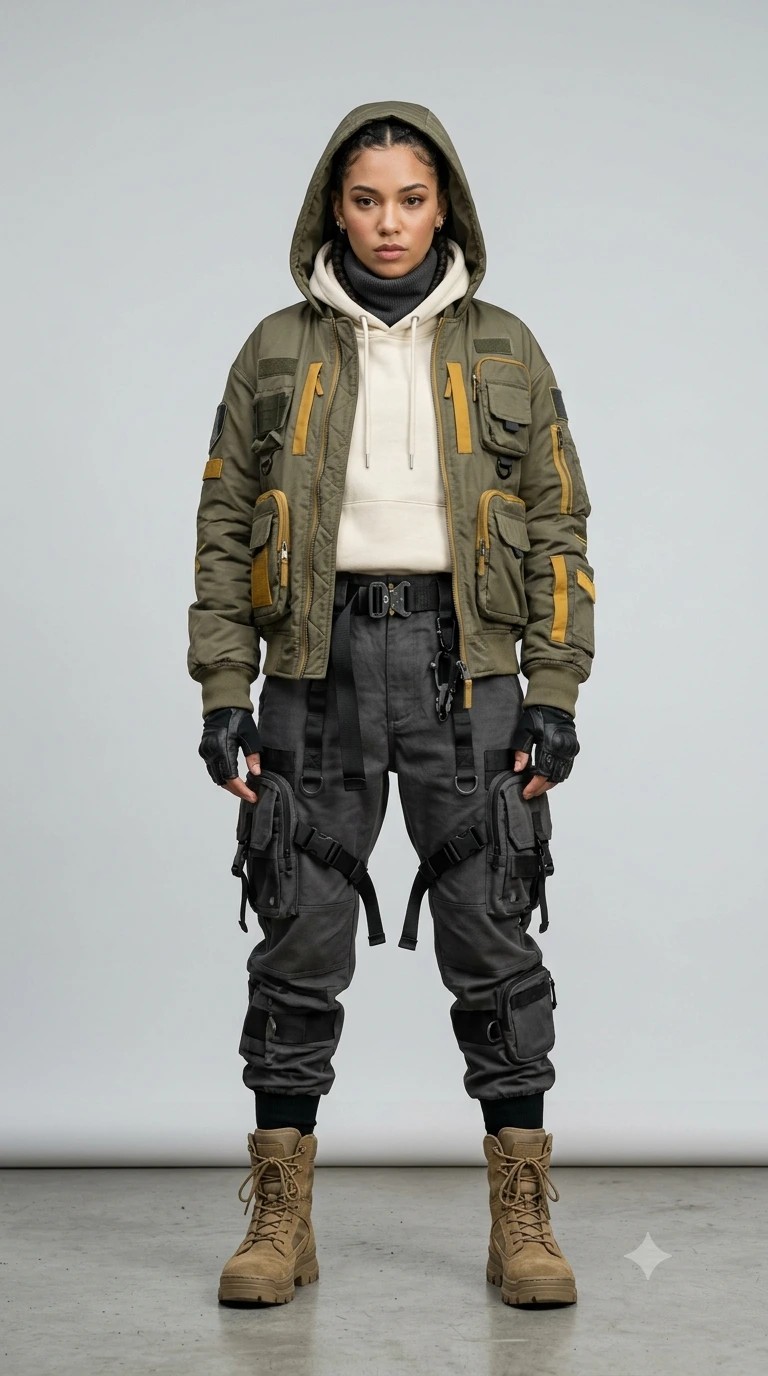
Full-body studio portrait of a young woman in futuristic high-fashion techwear. She is wearing a layered ensemble featuring an oversized olive-drab hooded bomber jacket with multiple tactical pockets and mustard-yellow accents. Underneath, a cream-colored hoodie and a high-neck scarf. She wears charcoal-grey heavy-duty cargo joggers adorned with straps, buckles, and large modular utility pouches. Accessories include fingerless tactical gloves, a utility belt with a quick-release buckle, and rugged tan combat boots with thick soles. The lighting is clean, high-key studio lighting with soft shadows against a neutral light grey background. 8k resolution, cinematic fashion photography, sharp focus, hyper-realistic textures of nylon, canvas, and leather. Aspect ratio is 9:16
About This Prompt
Auto GeneratedThis is a high-quality Portrait AI prompt crafted by Admin. It is designed to produce realistic, expressive portrait visuals with minimal iteration. The prompt uses carefully selected descriptors and stylistic cues optimised for Gemini AI, making it ideal for creators who want consistent, professional results.
How To Use
Reusable Guide- 1Copy the prompt using the "Copy Prompt" button above.
- 2Open your preferred AI model (Gemini AI) and paste the prompt into the input field.
- 3Optionally, replace bracketed placeholders (e.g. [subject], [style]) with your own values to personalise the output.
- 4Run the prompt and review the result — iterate by tweaking descriptors for different moods or compositions.
- 5Save or export your favourite generations directly from the AI tool's interface.
For best results, use this prompt as-is before making edits — the defaults are already optimised.