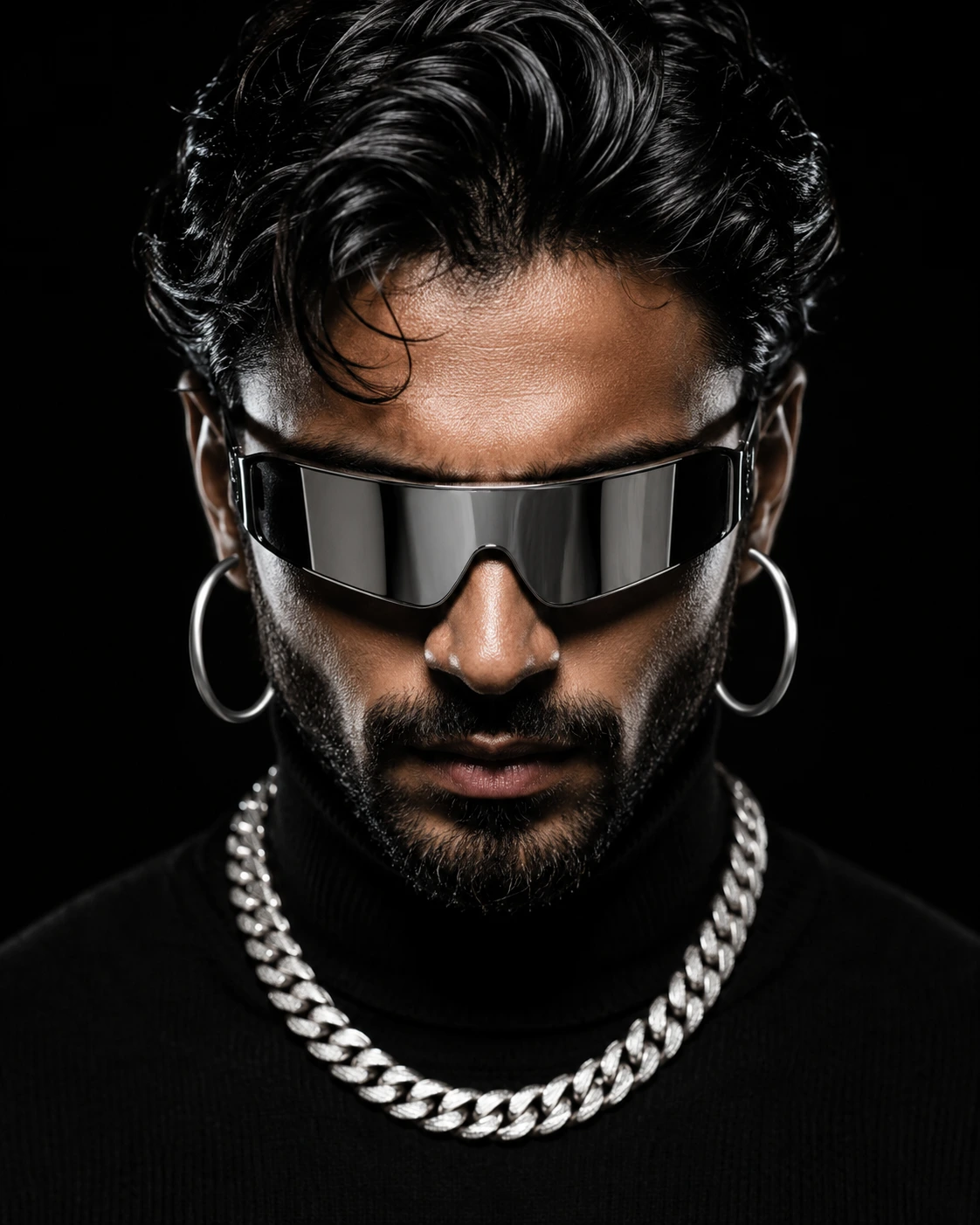
Futuristic Visor Portrait in Silver and Black
Create an epic men AI image using this high-quality prompt optimized for Chat GPT image generation.
Prompt Content
Use this prompt in your favorite AI image generator.
Ultra-realistic cinematic studio portrait of a rugged masculine male model with strong jawline, intense downward gaze, wearing futuristic mirrored silver visor sunglasses, large polished silver hoop earrings in both ears, a thick silver Cuban link chain necklace, and a black fitted turtleneck sweater.Symmetrical centered composition, head-and-shoulders close-up, black seamless background, dramatic high-contrast studio lighting, glossy hair texture, detailed skin pores and facial hair, luxury fashion editorial aesthetic, cyberpunk-meets-modern-mob-boss style, ultra-sharp focus, shallow depth of field, photorealistic, 8K, Hasselblad medium format look, 85mm lens, f/1.8, cinematic color grading, deep blacks, metallic reflections, Vogue-style men’s fashion campaign, hyper-detailed, premium luxury portrait photography. Negative prompt: low resolution, blurry, cartoon, illustration, anime, extra accessories, distorted face, asymmetrical eyes, overexposed skin, noisy background, watermark, text, logo, duplicate jewelry, exaggerated beard, smiling expression, soft focus, low detail.
About This Prompt
Auto GeneratedThis is a high-quality Men AI prompt crafted by Admin. It is designed to produce stunning visuals with minimal iteration. The prompt uses carefully selected descriptors and stylistic cues optimised for Chat GPT, making it ideal for creators who want consistent, professional results.
How To Use
Reusable Guide- 1Copy the prompt using the "Copy Prompt" button above.
- 2Open your preferred AI model (Chat GPT) and paste the prompt into the input field.
- 3Optionally, replace bracketed placeholders (e.g. [subject], [style]) with your own values to personalise the output.
- 4Run the prompt and review the result — iterate by tweaking descriptors for different moods or compositions.
- 5Save or export your favourite generations directly from the AI tool's interface.
For best results, use this prompt as-is before making edits — the defaults are already optimised.