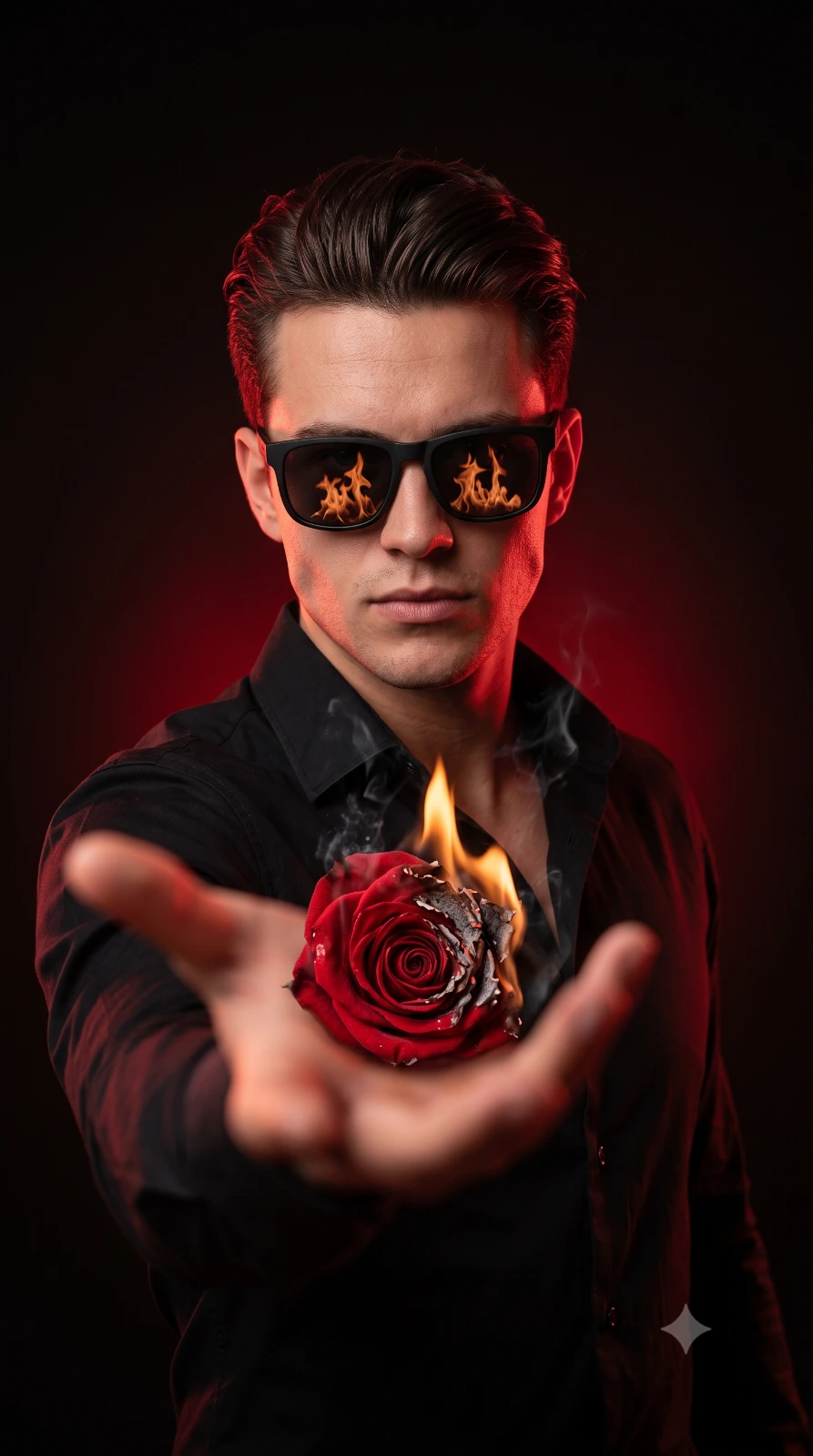
Man With Burning Rose Portrait
Create an epic men AI image using this high-quality prompt optimized for Gemini AI image generation.
Prompt Content
Use this prompt in your favorite AI image generator.
Use the uploaded man's face as the exact facial reference with maximum facial identity preservation (100% facial match). Keep the same face shape, facial structure, skin tone, facial proportions, hairstyle, and natural facial details. Ultra-realistic cinematic portrait of a stylish young man wearing a fitted black shirt and premium matte black sunglasses, reflect fire. He extends one hand toward the camera in a dramatic forced-perspective pose, creating a strong foreground blur. In his hand, he holds a burning red rose covered with glowing embers, ash particles, and subtle smoke effects. Intense confident attitude, head slightly tilted downward, body slightly angled, conveying power and mystery. Dramatic red and black cinematic lighting with high contrast, neon red rim light highlighting the hair, jawline, shoulders, and edges. Deep matte black studio background with a soft red gradient glow. Shallow depth of field, razor-sharp focus on the face, foreground hand artistically blurred. Hyper-detailed skin texture, realistic hair strands, sharp facial details, cinematic color grading, professional fashion photography, ultra-realistic, 8K HDR quality, masterpiece, vertical composition, aspect ratio 9:16.
About This Prompt
Auto GeneratedThis is a high-quality Men AI prompt crafted by Admin. It is designed to produce stunning visuals with minimal iteration. The prompt uses carefully selected descriptors and stylistic cues optimised for Gemini AI, making it ideal for creators who want consistent, professional results.
How To Use
Reusable Guide- 1Copy the prompt using the "Copy Prompt" button above.
- 2Open your preferred AI model (Gemini AI) and paste the prompt into the input field.
- 3Optionally, replace bracketed placeholders (e.g. [subject], [style]) with your own values to personalise the output.
- 4Run the prompt and review the result — iterate by tweaking descriptors for different moods or compositions.
- 5Save or export your favourite generations directly from the AI tool's interface.
For best results, use this prompt as-is before making edits — the defaults are already optimised.