Omnitrix Ascension — Master of Ten Transformations
Create an epic fantasy AI image using this high-quality prompt optimized for Gemini AI image generation.
Prompt Content
Use this prompt in your favorite AI image generator.
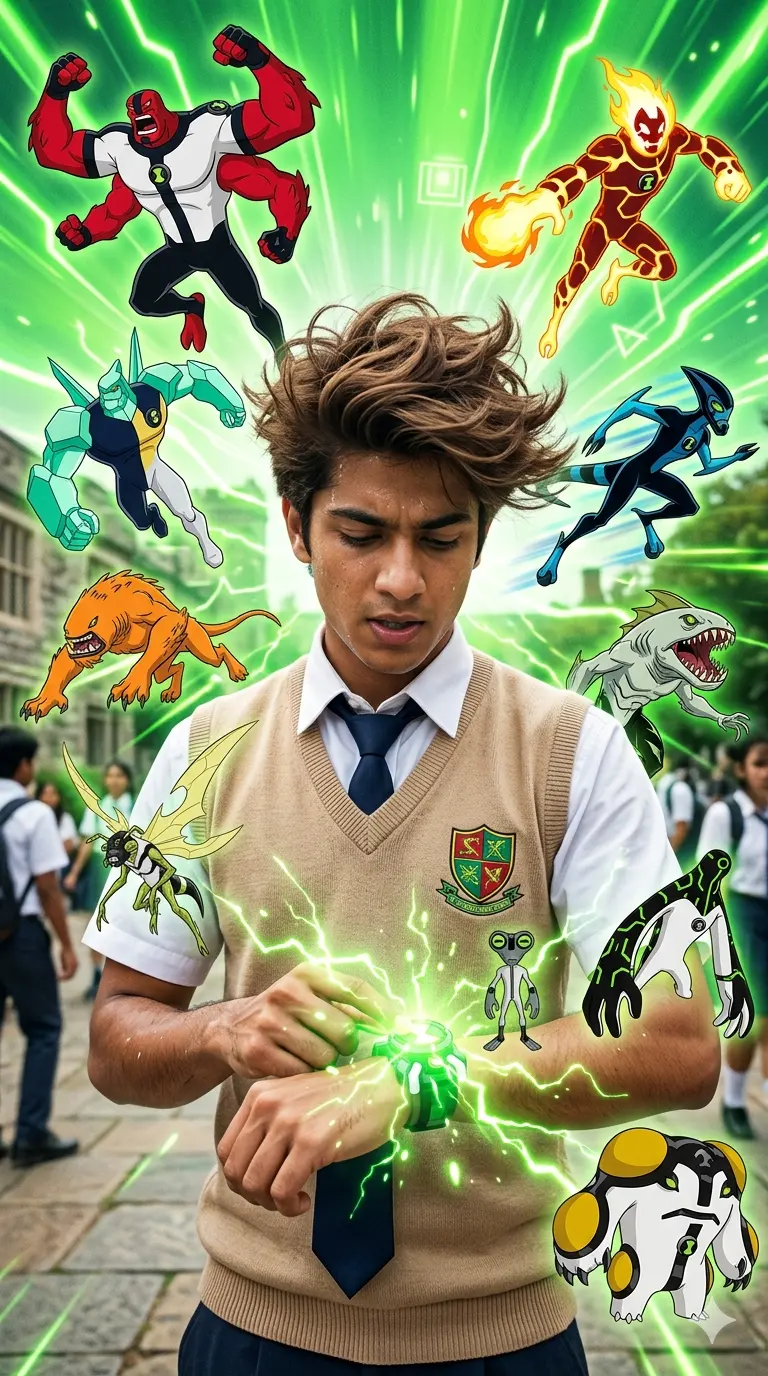
An Ultra-realstic of young indiam man is depicted in the foreground, he is shown with his arm raised, activating the Omnitrix, which is emitting green energy bolts, messy voluminous spiky brown hair gently blowing the wind. He is wearing a school-style uniform consisting of a white short-sleeved shirt, a dark necktie, and a beige V-neck sweater vest. Emblem: On his sweater vest, there is a shield-shaped crest featuring a stylized green and red design.. Alien Transformations: The image includes several of the original alien forms Ben can transform into, including: Four Arms: The large, red, four-armed figure at the top left. Heatblast: The fiery, orange-and-yellow figure at the top right. XLR8: The blue-and-black creature sprinting on the middle right. Diamondhead: The crystalline figure on the middle left. Stinkfly: The winged, insectoid alien hovering in the center. Grey Matter: The small, grey, intelligent alien near the center. Wildmutt: The orange, beast-like creature on the left. Ripjaws: The aquatic, shark-like creature on the right. Cannonbolt: The round, armored alien on the bottom right. Upgrade: The thin, green, technological alien on the middle right. The overall composition uses a bright green background with dynamic energy lines radiating from the Omnitrix, emphasizing the theme of transformation and power.--ar 9:16
About This Prompt
Auto GeneratedThis is a high-quality Fantasy AI prompt crafted by Admin. It is designed to produce rich, imaginative fantasy visuals with minimal iteration. The prompt uses carefully selected descriptors and stylistic cues optimised for Gemini AI, making it ideal for creators who want consistent, professional results.
How To Use
Reusable Guide- 1Copy the prompt using the "Copy Prompt" button above.
- 2Open your preferred AI model (Gemini AI) and paste the prompt into the input field.
- 3Optionally, replace bracketed placeholders (e.g. [subject], [style]) with your own values to personalise the output.
- 4Run the prompt and review the result — iterate by tweaking descriptors for different moods or compositions.
- 5Save or export your favourite generations directly from the AI tool's interface.
For best results, use this prompt as-is before making edits — the defaults are already optimised.