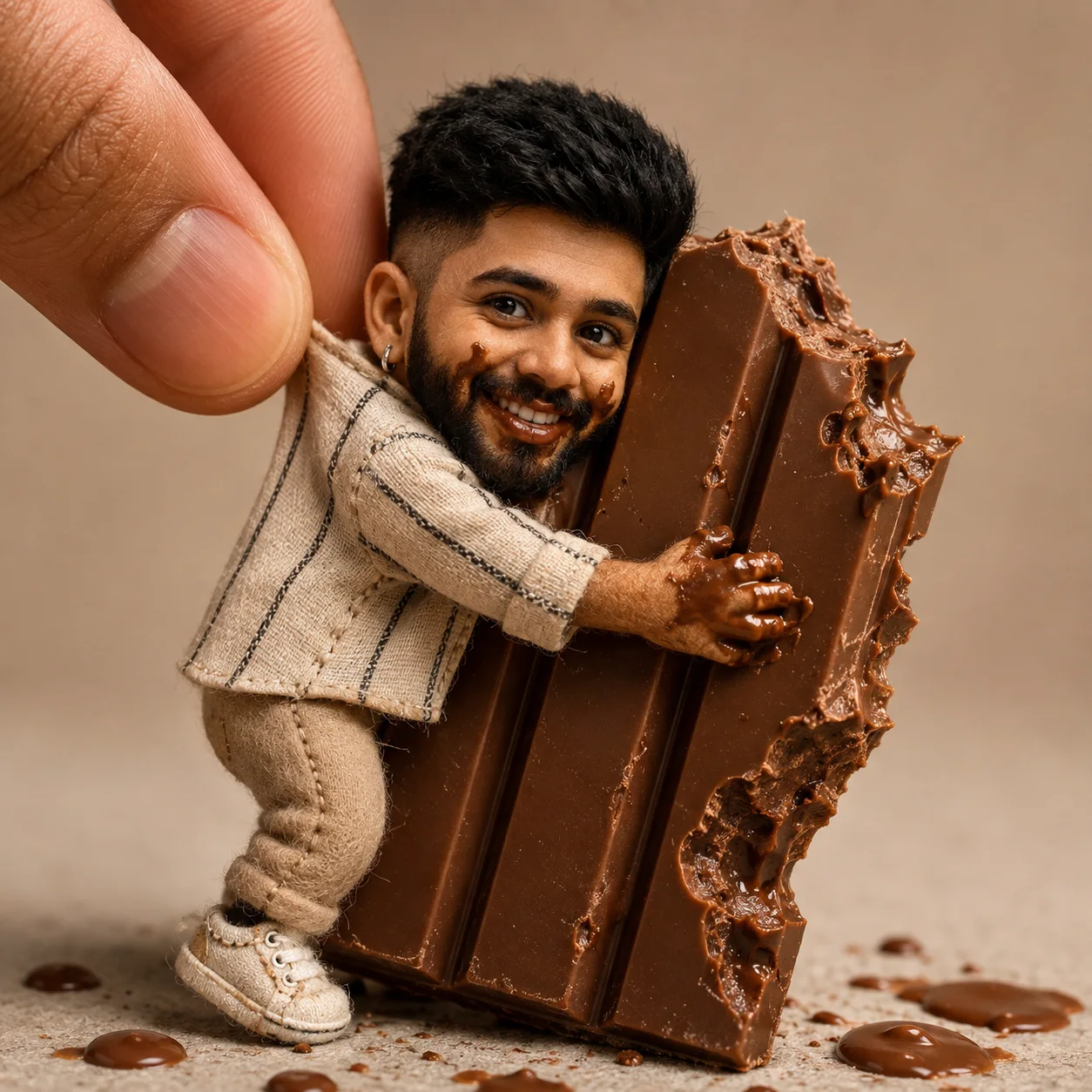
Tiny Doll Hugging a Giant Chocolate Bar
Create an epic men AI image using this high-quality prompt optimized for Chat GPT image generation.
Prompt Content
Use this prompt in your favorite AI image generator.
Use the uploaded photo as the only identity reference. Preserve the subject's face with exceptional accuracy, maintaining the exact facial structure, proportions, expression, hairstyle, skin tone, natural asymmetries, and all unique facial characteristics for maximum resemblance. Transform the person into an adorable handcrafted premium collectible male doll with a slightly oversized head, a tiny slender body, soft felt and fabric materials, visible artisan stitching, realistic 3D facial sculpting, lifelike glossy glass eyes, and luxurious handcrafted textures. The miniature doll is tightly hugging an enormous KitKat chocolate bar nearly the same size as his entire body. The chocolate already has several realistic bite marks.He wears a joyful, mischievous smile with chocolate smeared around his lips, cheeks, fingertips, and hands. Small drops of melted chocolate are scattered naturally on the surface beneath him. A gigantic human finger gently lifts the doll by the back of his shirt collar while he stubbornly refuses to let go of the oversized KitKat, creating a humorous, heartwarming, and irresistibly cute scene full of personality.Emphasize dramatic scale contrast between the tiny doll and the giant finger and chocolate bar. Use warm, bright studio lighting, a clean minimalist background, premium handcrafted diorama aesthetics, cinematic macro photography, shallow depth of field, ultra-realistic fabric fibers, detailed chocolate textures, photorealistic rendering, commercial-quality composition, and extreme facial fidelity to the uploaded reference photo. No text, no watermark, no cartoon, no anime, ultra-high detail, 8K quality, 1:1 ratio.
About This Prompt
Auto GeneratedThis is a high-quality Men AI prompt crafted by Admin. It is designed to produce stunning visuals with minimal iteration. The prompt uses carefully selected descriptors and stylistic cues optimised for Chat GPT, making it ideal for creators who want consistent, professional results.
How To Use
Reusable Guide- 1Copy the prompt using the "Copy Prompt" button above.
- 2Open your preferred AI model (Chat GPT) and paste the prompt into the input field.
- 3Optionally, replace bracketed placeholders (e.g. [subject], [style]) with your own values to personalise the output.
- 4Run the prompt and review the result — iterate by tweaking descriptors for different moods or compositions.
- 5Save or export your favourite generations directly from the AI tool's interface.
For best results, use this prompt as-is before making edits — the defaults are already optimised.