Chaotic Kitchen Collision: Animation Meets Reality
Create an epic anime AI image using this high-quality prompt optimized for Gemini AI image generation.
Prompt Content
Use this prompt in your favorite AI image generator.
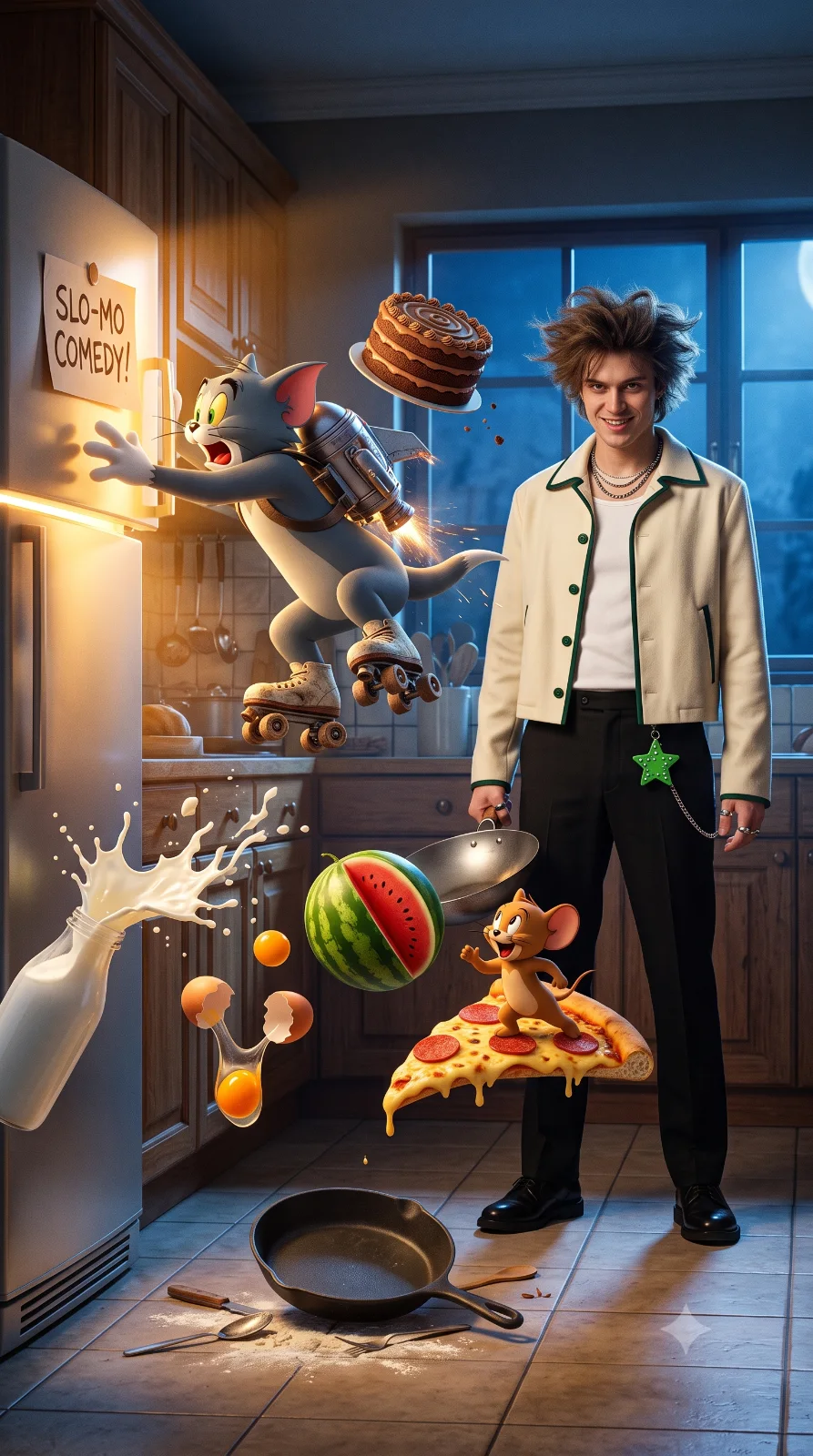
A highly detailed, cinematic 8K resolution action scene featuring Tom and Jerry in a chaotic, high-energy kitchen environment. Tom is mid-air, wearing vintage roller skates and a metallic jetpack, reaching for an open refrigerator door that has a sign reading 'SLO-MO COMEDY!' on it. A chocolate layer cake is flying through the air next to him. To the left, a bottle of milk is spilling, creating a dynamic splash, while broken eggshells and yolks are suspended in the air. In the foreground, Jerry is joyfully riding a large slice of pepperoni pizza through the air. A sliced watermelon is floating nearby, and a cast-iron skillet rests on the tiled floor. A young man tom and jerry bhind him a holding on wok a evil smilng, a wearing Jacket: A cream-colored, cropped jacket with dark green piping along the edges and collar, fastened with dark green buttons. Top: A simple white undershirt or crew-neck t-shirt. Pants: Tailored black trousers. Footwear: Black polished shoes. Jewelry: A layered silver necklace and silver rings. Accents: A unique, bright green, star-studded accessory attached to the pants via a silver chain and messy voluminous spiky brown hair gently blowing the wind. Lighting Style The image utilizes a cinematic contrast between the warm, golden light emitting from the refrigerator and the cool, blue moonlight coming from the exterior.--ar 9:16
About This Prompt
Auto GeneratedThis is a high-quality Anime AI prompt crafted by Admin. It is designed to produce detailed anime-style visuals with minimal iteration. The prompt uses carefully selected descriptors and stylistic cues optimised for Gemini AI, making it ideal for creators who want consistent, professional results.
How To Use
Reusable Guide- 1Copy the prompt using the "Copy Prompt" button above.
- 2Open your preferred AI model (Gemini AI) and paste the prompt into the input field.
- 3Optionally, replace bracketed placeholders (e.g. [subject], [style]) with your own values to personalise the output.
- 4Run the prompt and review the result — iterate by tweaking descriptors for different moods or compositions.
- 5Save or export your favourite generations directly from the AI tool's interface.
For best results, use this prompt as-is before making edits — the defaults are already optimised.