Hope Beneath Open Skies
Create an epic men AI image using this high-quality prompt optimized for Chat GPT image generation.
Prompt Content
Use this prompt in your favorite AI image generator.
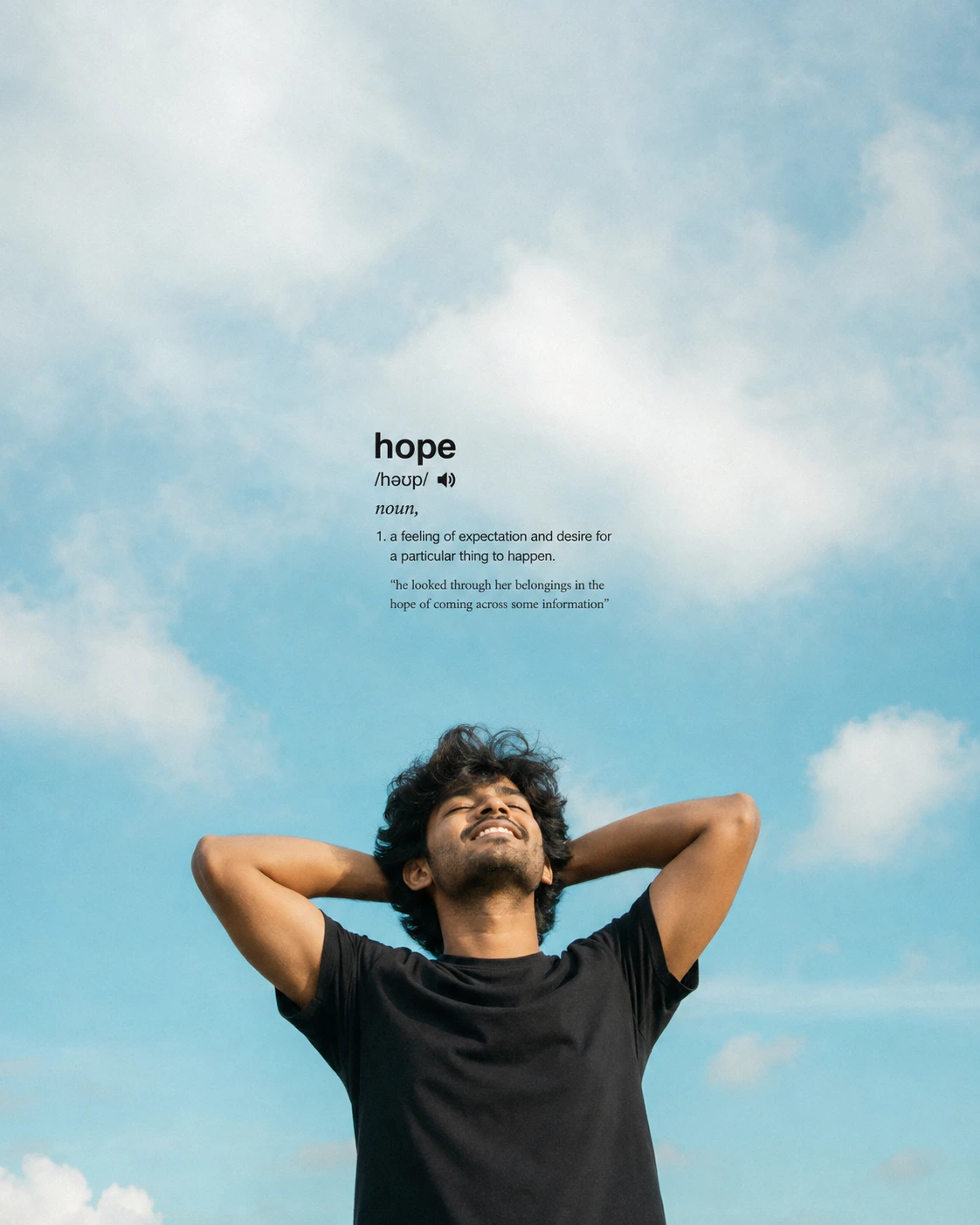
Create a peaceful, minimalist, ultra-realistic cinematic outdoor portrait of a young South Indian man standing beneath an enormous open blue sky, with the entire composition centered around hope, freedom, optimism, inner peace and quiet happiness. Compose the image in a 4:5 Instagram post format, with approximately the upper two-thirds of the frame dominated by expansive negative space and the man positioned in the lower center. Create a beautiful natural sky transitioning from very pale, almost-white blue at the top into a richer soft cyan and turquoise blue toward the middle and lower portions, with several large fluffy white clouds scattered naturally at different heights and distances. Keep the atmosphere bright, airy, clean and slightly dreamy, with soft daylight and gentle pastel color grading rather than dramatic contrast. Place a young South Indian man in the lower-center foreground, framed approximately from the waist upward and photographed from a slightly low camera angle so the vast sky rises dramatically behind him. He has warm medium-brown skin, thick naturally messy wavy black hair moving slightly in the breeze, subtle facial hair and realistic, unretouched skin texture. Dress him in a completely simple plain black crew-neck T-shirt with no visible logos, graphics or accessories. His pose should feel spontaneous, carefree and completely natural. Raise both arms and bend them outward at the elbows, placing both hands comfortably behind the back of his head with his elbows extending widely to either side. Tilt his face slightly upward toward the sky, gently close his eyes and give him a natural relaxed smile showing a little teeth, as though he has finally released a burden and is quietly enjoying the wind, sunlight and openness around him. His expression should communicate genuine hope, relief, freedom, contentment and peaceful confidence rather than excitement or exaggerated happiness. Use warm natural daylight on his face and arms with realistic highlights and soft shadows, while preserving authentic medium-brown skin tones. Allow the black T-shirt to create a strong visual contrast against the luminous cyan-blue sky. Keep the photograph slightly soft and organic with subtle film grain, gentle highlight bloom, realistic atmospheric haze and understated cinematic color grading, resembling a candid photograph captured during a beautiful clear afternoon rather than a polished studio portrait. In the open sky directly above the man's head, around the middle of the composition, integrate minimalist dictionary-style typography for the word “hope”. Set “hope” in a clean lowercase black sans-serif font. Directly underneath, place the phonetic pronunciation “/həʊp/” with a tiny speaker icon, followed by the italic word “noun,”. Then include the definition: “1. a feeling of expectation and desire for a particular thing to happen.” Beneath that, add a smaller example sentence reading: “he looked through her belongings in the hope of coming across some information” Keep the dictionary typography compact, understated and left-aligned with generous breathing space around it, resembling an elegant dictionary entry floating naturally within the sky. Do not add any other text, objects, buildings, landscape elements or visual distractions. The finished image should feel like a poetic visual definition of hope, combining a vast dreamy blue sky, soft white clouds, minimalist editorial typography and the peaceful body language of a young man who feels emotionally free, optimistic and completely present in the moment. Use ultra-realistic photography, natural proportions, authentic skin texture, subtle analog grain and a calm contemporary editorial aesthetic.
About This Prompt
Auto GeneratedThis is a high-quality Men AI prompt crafted by Admin. It is designed to produce stunning visuals with minimal iteration. The prompt uses carefully selected descriptors and stylistic cues optimised for Chat GPT, making it ideal for creators who want consistent, professional results.
How To Use
Reusable Guide- 1Copy the prompt using the "Copy Prompt" button above.
- 2Open your preferred AI model (Chat GPT) and paste the prompt into the input field.
- 3Optionally, replace bracketed placeholders (e.g. [subject], [style]) with your own values to personalise the output.
- 4Run the prompt and review the result — iterate by tweaking descriptors for different moods or compositions.
- 5Save or export your favourite generations directly from the AI tool's interface.
For best results, use this prompt as-is before making edits — the defaults are already optimised.