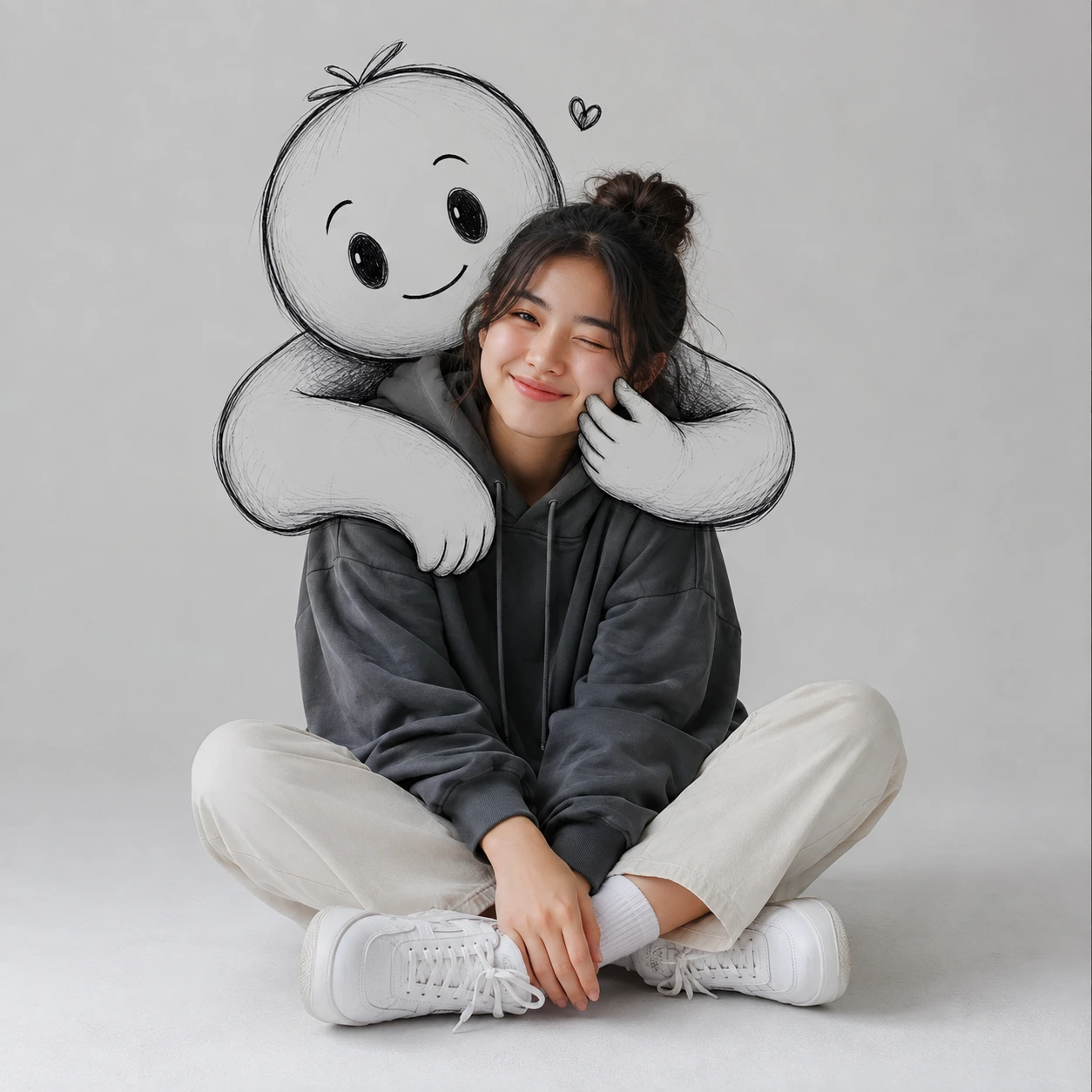
Playful Doodle Hug Studio Portrait
Create an epic women AI image using this high-quality prompt optimized for Chat GPT image generation.
Prompt Content
Use this prompt in your favorite AI image generator.
Create a premium photorealistic minimalist portrait in a 1:1 square composition featuring a cute young woman seated casually on the floor inside a clean contemporary studio with a seamless light grey backdrop. She wears an oversized dark charcoal hoodie, cream straight-leg pants, white socks, and chunky white sneakers. Her pose is relaxed with naturally crossed legs, shoulders slightly angled toward the camera, one eye playfully winking, and a warm, subtle smile that conveys charm and confidence.Behind her, integrate a large hand-drawn black-and-white doodle character as if it exists in the same space. The whimsical cartoon figure gently hugs her from behind, wrapping its oversized sketch-style arms around her shoulders while softly squeezing one of her cheeks. The interaction should feel affectionate, playful, and seamlessly blended with reality, creating the illusion that the illustrated character is physically embracing her.Use soft diffused studio lighting with natural shadow falloff, subtle rim lighting for separation, realistic skin tones, premium fabric textures, crisp sneaker details, and finely rendered pencil-like doodle lines. Maintain a clean, uncluttered aesthetic with balanced negative space and perfect subject centering.Capture with a full-frame camera, 50mm lens, f/2.8, ISO 100, producing shallow depth of field while keeping the subject and doodle embrace sharply in focus. Ultra-detailed, cinematic, editorial-quality, highly realistic, natural color grading, HDR, 8K resolution.
About This Prompt
Auto GeneratedThis is a high-quality Women AI prompt crafted by Admin. It is designed to produce stunning visuals with minimal iteration. The prompt uses carefully selected descriptors and stylistic cues optimised for Chat GPT, making it ideal for creators who want consistent, professional results.
How To Use
Reusable Guide- 1Copy the prompt using the "Copy Prompt" button above.
- 2Open your preferred AI model (Chat GPT) and paste the prompt into the input field.
- 3Optionally, replace bracketed placeholders (e.g. [subject], [style]) with your own values to personalise the output.
- 4Run the prompt and review the result — iterate by tweaking descriptors for different moods or compositions.
- 5Save or export your favourite generations directly from the AI tool's interface.
For best results, use this prompt as-is before making edits — the defaults are already optimised.