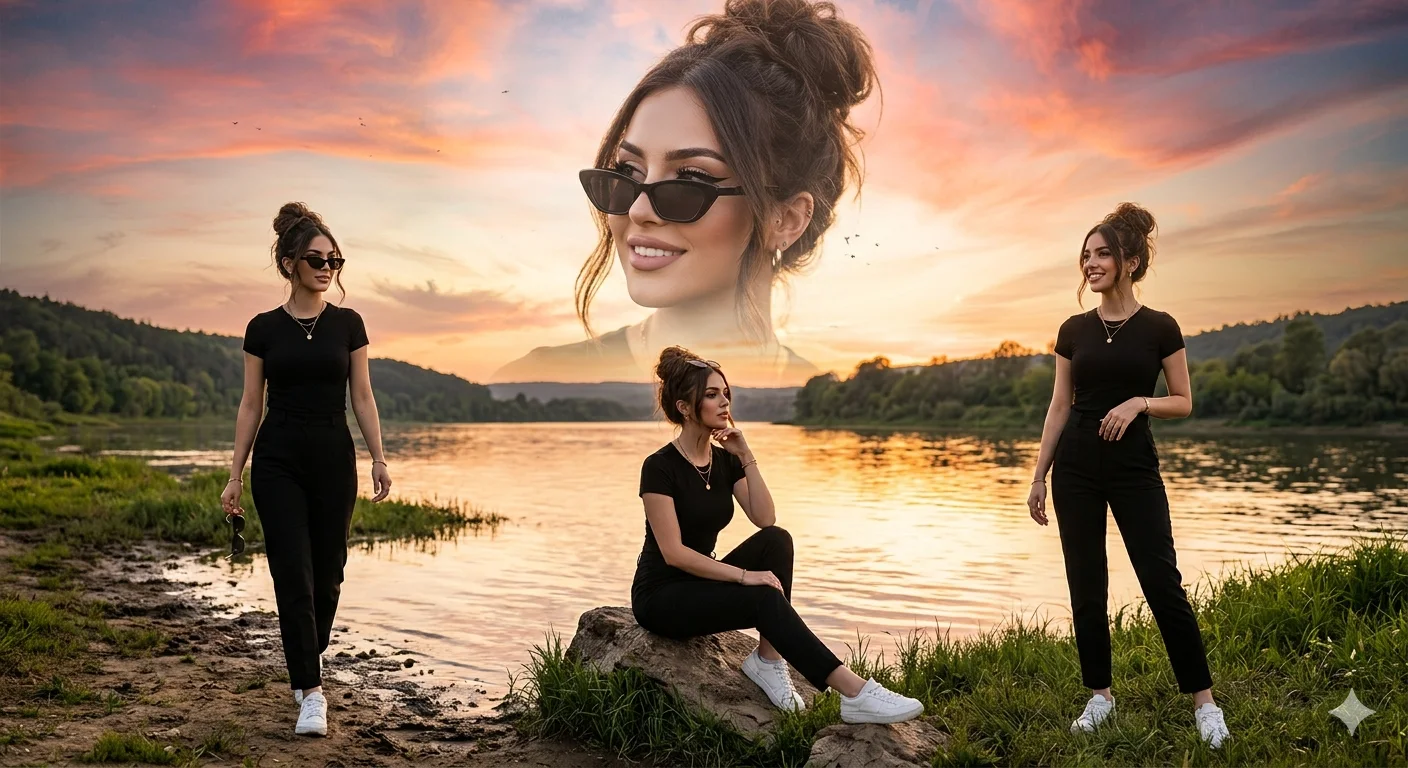
Golden Hour Riverside Multi-Exposure Fashion Portrait
Create an epic women AI image using this high-quality prompt optimized for Gemini AI image generation.
Prompt Content
Use this prompt in your favorite AI image generator.
Ultra-realistic cinematic portrait of a stylish young woman featured in a dramatic multi-exposure composite scene beside a calm riverside during golden hour sunset. The composition includes three full-body versions of the woman — one standing confidently, one sitting gracefully near the riverbank, and one walking naturally along the shoreline.Above them appears a massive semi-transparent close-up portrait of the same woman blended into the sky, creating a dreamy cinematic double-exposure effect. The woman wears a fitted black t-shirt, black high-waisted pants, and clean white sneakers. Stylish black sunglasses enhance the modern fashion look. Her long dark brown hair is styled in a voluminous messy bun with soft face-framing strands gently moving in the breeze.Makeup features winged eyeliner, ultra-defined arched eyebrows, long thick eyelashes, soft peach-glow skin, subtle contouring, and natural rosy nude lipstick. Elegant minimal jewelry including a delicate chain necklace and small earrings. The riverside reflects the warm golden sunlight, creating shimmering highlights across the water. The sky is filled with beautiful orange, pink, and golden sunset tones with soft clouds. Birds fly gracefully in the background, adding motion and atmosphere.Cinematic depth of field, ultra-detailed skin texture, realistic lighting, HDR photography, professional color grading, magazine-quality fashion portrait, highly detailed clothing folds, realistic reflections, masterpiece composition, 8K ultra-realistic photography, dramatic storytelling, dreamy golden-hour ambiance, sharp focus, natural shadows, breathtaking visual impact.
About This Prompt
Auto GeneratedThis is a high-quality Women AI prompt crafted by Admin. It is designed to produce stunning visuals with minimal iteration. The prompt uses carefully selected descriptors and stylistic cues optimised for Gemini AI, making it ideal for creators who want consistent, professional results.
How To Use
Reusable Guide- 1Copy the prompt using the "Copy Prompt" button above.
- 2Open your preferred AI model (Gemini AI) and paste the prompt into the input field.
- 3Optionally, replace bracketed placeholders (e.g. [subject], [style]) with your own values to personalise the output.
- 4Run the prompt and review the result — iterate by tweaking descriptors for different moods or compositions.
- 5Save or export your favourite generations directly from the AI tool's interface.
For best results, use this prompt as-is before making edits — the defaults are already optimised.