Six Frames of Goodbye — I.S.H.A.N Emotional Storyboard
Create an epic cinematic AI image using this high-quality prompt optimized for Gemini AI image generation.
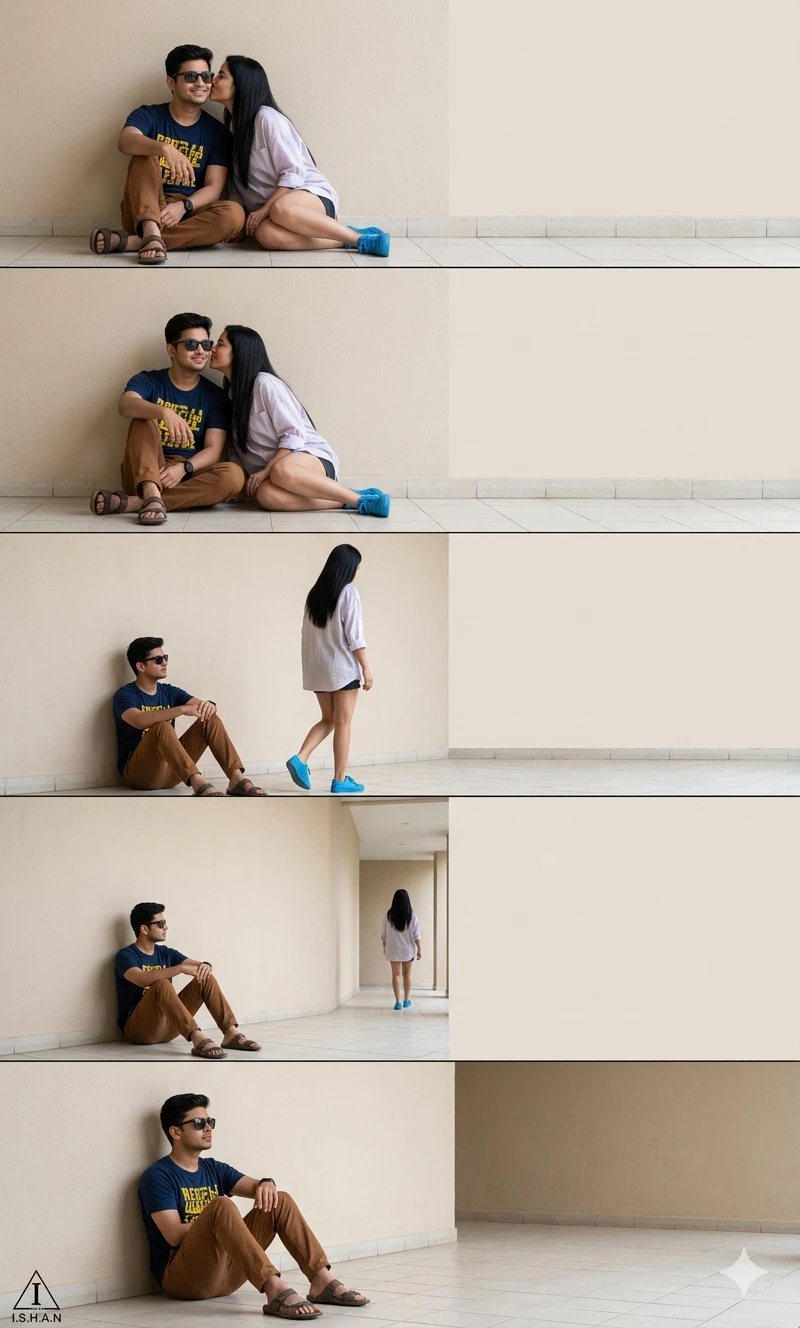
Prompt Content
Use this prompt in your favorite AI image generator.
Ultra-realistic cinematic storyboard-style couple photography composed of six horizontal panels stacked vertically, showing an emotional sequence of a young couple sitting against a minimal beige wall in a modern outdoor corridor. In the first frame, the woman lovingly kisses the man on the cheek while both sit casually on the tiled floor. The man wears black sunglasses, a navy blue t-shirt with yellow graphic print, brown pants, and sandals, smiling softly.The woman has long straight black hair, wearing a light pastel oversized shirt, dark shorts, and bright blue sneakers. In the following frames, the woman slowly stands up and walks away toward the right side of the frame while the man remains seated against the wall, watching quietly with a calm emotional expression. Each panel captures a different stage of her movement, creating a visual storytelling effect of separation and distance.Large empty negative space on the right side of each frame, soft natural daylight, clean minimalist background, neutral cream tones, tiled flooring, realistic body proportions, candid couple emotion, high-resolution DSLR photography, wide-angle composition, subtle shadows, realistic textures, emotional storytelling aesthetic, 8k ultra detailed.” In the left bottom corner add a small triangle with a stylized "I" inside it and a text "I.S.H.A.N" beneath it.Keep the face 100% same as in the uploaded picture.
About This Prompt
Auto GeneratedThis is a high-quality Cinematic AI prompt crafted by Admin. It is designed to produce cinematic, film-quality visuals with minimal iteration. The prompt uses carefully selected descriptors and stylistic cues optimised for Gemini AI, making it ideal for creators who want consistent, professional results.
How To Use
Reusable Guide- 1Copy the prompt using the "Copy Prompt" button above.
- 2Open your preferred AI model (Gemini AI) and paste the prompt into the input field.
- 3Optionally, replace bracketed placeholders (e.g. [subject], [style]) with your own values to personalise the output.
- 4Run the prompt and review the result — iterate by tweaking descriptors for different moods or compositions.
- 5Save or export your favourite generations directly from the AI tool's interface.
For best results, use this prompt as-is before making edits — the defaults are already optimised.


