THE ROYAL CHALLENGE: RCB Warrior & The Lion King Editorial
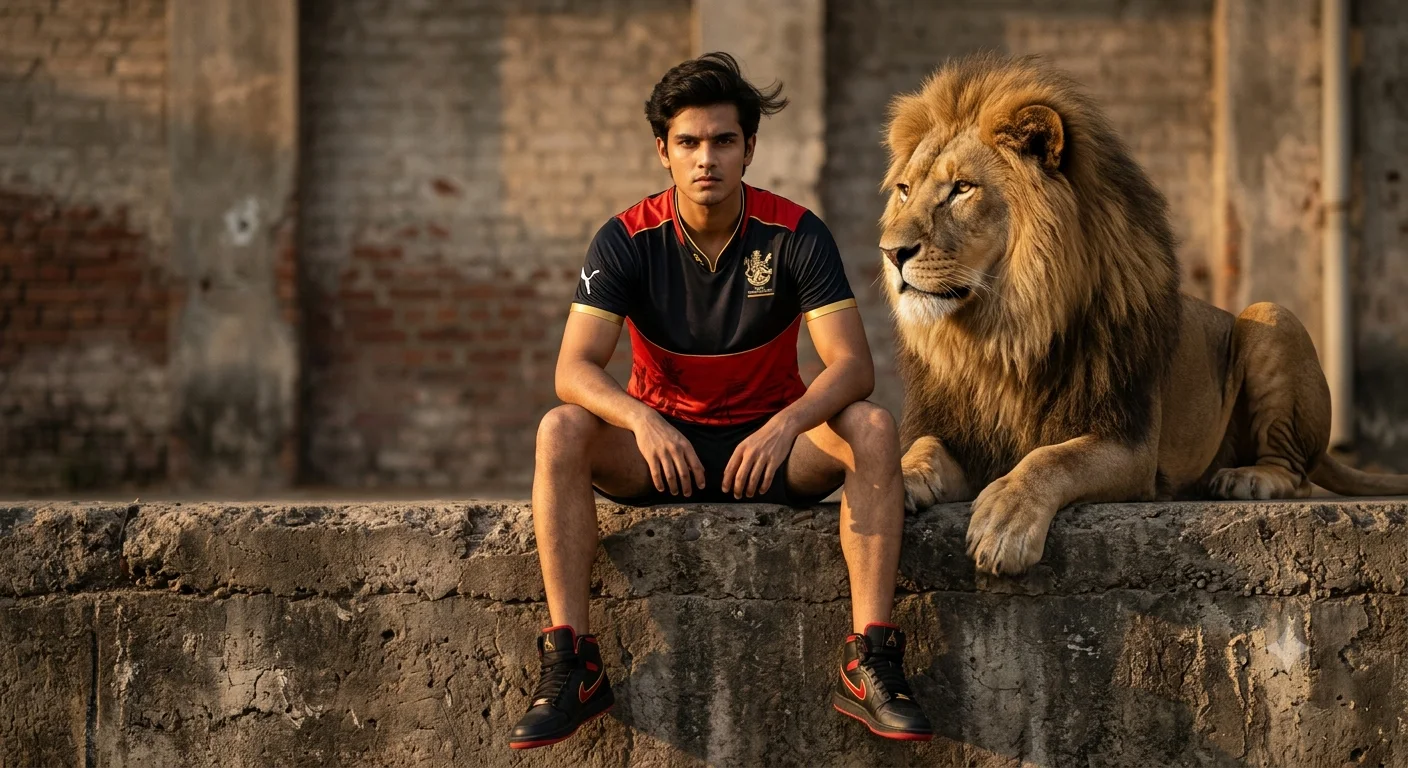
Create an epic cinematic AI image using this high-quality prompt optimized for Gemini AI image generation.
Prompt Content
Use this prompt in your favorite AI image generator.
FULL-BODY FASHION EDITORIAL SHOT OF A CONFIDENT YOUNG MALE MODEL SITTING ON A ROUGH URBAN CONCRETE LEDGE, LEGS APART IN A RELAXED YET DOMINANT POSE, STARING DIRECTLY INTO THE CAMERA WITH A FEARLESS, INTENSE EXPRESSION. WEARING THE RCB 2025/26 RED-BLACK CRICKET JERSEY, PREMIUM BLACK-RED-GOLD HIGH-TOP SNEAKERS, AND SPORTY LUXURY STREETWEAR STYLING. SLIGHT WIND FLOWING THROUGH HIS HAIR AND FABRIC FOR A CINEMATIC FEEL. BESIDE HIM IS A MASSIVE REALISTIC MALE LION — NOT CARTOON, NOT CGI, NOT ARTIFICIAL — WITH NATURAL GOLDEN FUR, DETAILED MUSCULAR BODY, SHARP EYES, AND A POWERFUL ROYAL PRESENCE. THE LION IS CALMLY INTERACTING WITH THE MODEL LIKE A TRUSTED COMPANION, PERFECTLY BLENDED INTO THE SCENE WITH REALISTIC LIGHTING, SHADOWS, FUR DETAIL, AND NATURAL ANATOMY. HIGH-END FASHION EDITORIAL STYLE, ULTRA REALISTIC, CINEMATIC COLOR GRADING, GOLDEN HOUR LIGHTING, SHALLOW DEPTH OF FIELD, HYPER-DETAILED TEXTURES, LUXURY SPORTS MAGAZINE AESTHETIC, SHOT ON HASSELBLAD X2D, 85MM LENS, 8K UHD, PHOTOREALISTIC, EPIC ATMOSPHERE.
About This Prompt
Auto GeneratedThis is a high-quality Cinematic AI prompt crafted by Admin. It is designed to produce cinematic, film-quality visuals with minimal iteration. The prompt uses carefully selected descriptors and stylistic cues optimised for Gemini AI, making it ideal for creators who want consistent, professional results.
How To Use
Reusable Guide- 1Copy the prompt using the "Copy Prompt" button above.
- 2Open your preferred AI model (Gemini AI) and paste the prompt into the input field.
- 3Optionally, replace bracketed placeholders (e.g. [subject], [style]) with your own values to personalise the output.
- 4Run the prompt and review the result — iterate by tweaking descriptors for different moods or compositions.
- 5Save or export your favourite generations directly from the AI tool's interface.
For best results, use this prompt as-is before making edits — the defaults are already optimised.


